


Can you design a fully parametric, 3D-printable part entirely from text prompts in under an hour?
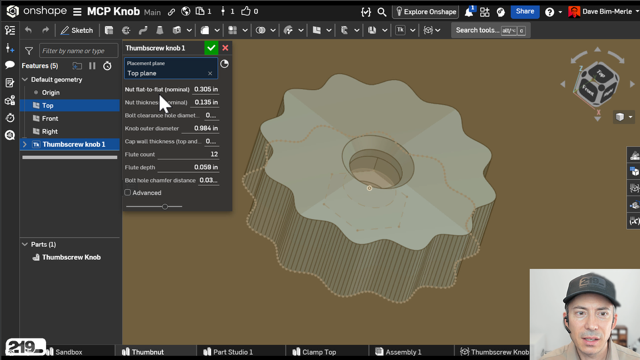
In this video, I take Onshape’s brand-new Model Context Protocol (MCP) server for a test drive. Using Claude and Gemini, I generate a functional thumbscrew knob – going from a simple text prompt to a physical, 3D-printed part with a captive nut.
In this technical breakdown, we look past the hype and start to look where AI-driven CAD actually fits into professional engineering workflows, R&D environments, and consulting practices.
Tech Stack Used
- CAD Platform: Onshape (with free MCP Server subscription)
- AI Assistants: Claude (via Claude Code in VS Code) & Gemini (via Antigravity client)
- Scripting: Onshape FeatureScript (~166 lines of AI-generated code)
- Slicer: Bambu Studio (for programming layer pauses)
- 3D Printer: Bambu
Professional Takeaways & Use Cases
Onshape’s MCP server was released recently, and in about an hour of testing, we had a physical part in hand. While it’s early, we see three primary use cases for AI-generated FeatureScript in professional R&D workflows:
- Non-Mission-Critical Parts: Quickly spinning up utility parts, custom knobs, brackets, or test fixtures.
- Automating Repetitive Features: Creating custom Featurescripts to handle routine modeling tasks (e.g., standardizing PCB mounting bosses with pre-set offsets and clearance holes).
- Math-Driven Geometries: Using the AI to calculate complex mathematical curves and flutes that would be tedious to model manually.
Professional Considerations
As engineering teams adopt this, we must remain mindful of:
- IP & Confidentiality: The implications of sharing design concepts with external LLMs.
- Maintainability: Shifting design intent from visual, easily editable feature trees into hundreds of lines of code that CAD users may not understand.
Resources Mentioned in Video
Onshape MCP Server Announcement & Blog (Look for MCP Server Subscription info in account settings)